These Trashketball rules turn an ordinary set of review questions into an active classroom game. Students answer a question, earn points, and shoot a crumpled piece of paper into a trash can for bonus points.
For some reason, adding a trash can and a paper ball can turn an ordinary review question into the final seconds of the national championship.
Trashketball Rules for the Classroom
Here is the quick version of how to play Trashketball:
- Divide the class into three to five teams.
- Give the active team one review question.
- Award two points when the team answers correctly.
- Let one student attempt a two-point or three-point shot into the trash can.
- Add the shot value to the team’s score when the paper ball goes in.
- Award no points or shot after an incorrect answer unless you are using the steal variation.
- Rotate to the next team and require teams to change shooters each turn.
Continue until you have used every review question. The team with the most points wins.
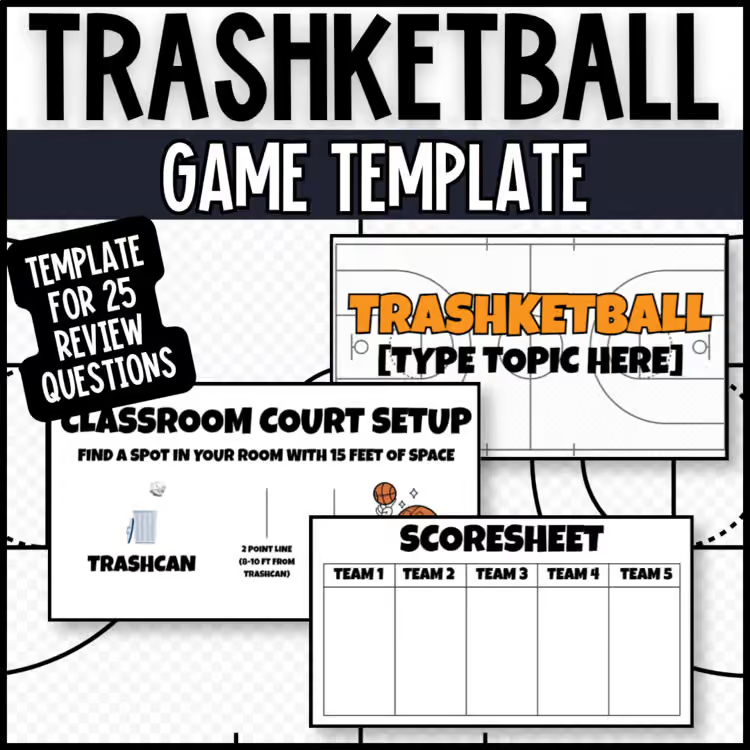
I created this editable Trashketball Review Game Template so teachers can add their own questions and use the game with any subject or grade level. It includes the rules, court setup, score sheets, and editable question slides.
Shop the Trashketball Game Template on TPT
Setting Up the Classroom
The setup does not need to be complicated. Find an open area of the classroom, place a trash can at one end, and crumple a piece of paper into a ball.
I usually make two shooting lines with painter’s tape. The two-point line is about 8 to 10 feet from the trash can, and the three-point line is about 12 to 14 feet away. You can move both lines closer depending on the age of your students and the amount of space in your room.
You may also want to move backpacks and chairs out of the way. Students become surprisingly committed to Trashketball once the score gets close.
How Trashketball Scoring Works
I divide the class into five teams. You can use fewer teams with a smaller class, but five usually keeps the groups from becoming too large. I also let students create team names when we have time.
The first team receives a review question. If the team answers correctly, it earns two points and gets a chance to shoot. The team can attempt a two-pointer from the closer line or take the riskier three-point shot.
If the student makes the shot, the team earns those bonus points. That means a team can score up to five points during one turn: two for the correct answer and three for a successful long-distance shot.
If the team answers incorrectly, it earns no points and does not shoot. Play then moves to the next team. Continue rotating until all the questions have been answered.
I also make teams rotate shooters. Otherwise, the same student who plays basketball will take every shot while the rest of the group becomes an enthusiastic coaching staff.
Keep Every Student Involved
The only problem with some team review games is that students stop thinking when it is not their turn.
An easy fix is to have everyone answer each question on a small whiteboard or sheet of paper. The active team still answers first, but every student has to work through the question.
You can also allow teams to steal. When the active team answers incorrectly, ask the other teams to reveal their answers. A team with the correct response can earn the two points and take the shot.
That little change keeps everyone paying attention because any question could become a scoring opportunity.
Try the Everybody Shoots Rule
Another fun variation is requiring every student on the team to shoot once before anyone gets a second turn.
This keeps the same two students from taking every shot and makes the game feel more inclusive. It also leads to some of the best moments. A student who has missed every shot suddenly makes a three-pointer, and the room completely loses its mind.
You can also give teams a few seconds to decide which shooting line they want to use. Some groups will take the safe two-pointer every time. Others will immediately become reckless and attempt nothing but threes.
Both strategies are entertaining.
Make Trashketball Work for Any Subject
Trashketball works with almost anything you need to review. You can use it for math problems, vocabulary, grammar, science concepts, test preparation, or social studies questions.
For example, you could reuse questions from a scientific method activity or a 13 Colonies lesson to create a quick end-of-unit game.
The editable Trashketball Review Game Template lets you type in your own topic, questions, and answer choices in Canva. Each question can be followed by an answer slide with the correct choice highlighted, making it easy to review the answer before moving to the next team.
Once you create one game, you can reuse the template throughout the year by changing the questions.
The Trashketball rules are simple enough for students to understand quickly, but the combination of teamwork, risk, and throwing paper across the classroom makes the review feel completely different.
Sometimes that is all students need: the exact same content, plus permission to throw something into a trash can.